In this article, you will learn how Sero Fashion works, what you need to get started, what results you can expect, and which pitfalls to avoid. You will receive a practical workflow for e-commerce fashion photography, insights into ROI, and tips for brand consistency. Ready to discover how AI fashion photography makes your team faster and more productive? Schedule a demo through Sero Fashion.
What is Sero Fashion, in 60 seconds
A short video about the Sero Fashion tool.
The short answer: for busy teams
Sero Fashion is an AI tool that generates fashion photography based on your product images and chosen AI models for fashion. You upload a photo of clothing, select a digital model, choose poses and backgrounds, and receive professional fashion photography ready for your webshop. This replaces or complements traditional photoshoots without the need for studios, model bookings, or weeks of planning. You generate variants in hours instead of days, with full control over lighting, scenes, and styling.
The biggest advantage: you save tens of thousands of euros per collection because you no longer need to purchase external photoshoots or pay model rights. The quality is outstanding: 4K studio quality, consistent product representation, and complete creative control.
The simple explanation
Imagine: you have a photo of a dress on a hanger. You upload that photo, click on a 'digital mannequin' that you like, and say: "Show this dress on this model, in this pose, with that background." Within minutes, you get a realistic fashion photo as if a real shoot had taken place. The AI 'fits' your garment onto the model, considers lighting conditions, and ensures that seams, colors, and details are correct.
Important: Sero Fashion is primarily intended for e-commerce fashion photos and on-model content. For complex art-direction or hero campaigns, traditional photography remains valuable, but for scalable product variants (PDP, PLP, marketplaces), AI delivers hyper-realistic visuals that can go live immediately.
Want to see if it fits your collection? Schedule a demo via Sero Studio.
How do you create AI photoshoots for fashion with Sero Fashion?
Step by step: upload product, choose model, generate images
The workflow is clear. You upload your product photos into Sero Fashion. Note: sharp images with good lighting work best, but even less detailed images yield good results. The tool recognizes the clothing type and fit. Then you choose an AI image model that matches your brand: age, style, appearance. You can generate your own models based on a brand description or upload existing models, which are reproduced royalty-free.
Next, you select background, setting, and pose. Want a studio look, an editorial vibe, or a lifestyle setting? You get an instant preview. After generation, you assess the output: are the seams correct, does the product color match well, does the fit make sense? This QA step takes seconds per image. Approved images are exported in the correct format for your webshop, marketplace, or ads.
How you create variants: changing backgrounds and studio looks
The power lies in speed and variety. You don’t have to photograph again to change a summer setup to a winter background. Upload your garment from multiple angles (front, side, back), so the clothing item remains correct in all poses. Create collections by combining multiple items: style complete outfits without a new shoot.
You can change backgrounds for seasons, campaigns, or A/B tests without additional costs. The studio-quality AI ensures consistent lighting and a professional appearance. Each SKU gets the same tonality and brand look, which is particularly important for large catalogs.
Do note that you check your images individually: bulk editing is possible, but you add clothing items or collections one by one and check details before they go live.
What results and use cases do AI photoshoots deliver for e-commerce?
Practical examples for fashion brands (PDP, campaigns, marketplaces)
E-commerce fashion photos for PDP and PLP are the most common applications. You generate on-model variants that improve conversion: customers see how a clothing item falls and fits. For editorial fashion photography (socials, ads), you create quick, appealing visuals without a shoot. With new colors or designs, you can re-shoot in hours instead of weeks.
For marketplaces like bol.com, consistency is crucial. With Sero Fashion, you generate images that meet guidelines: correct crop, background, lighting. You create different variants for each channel without new production. In a Shopify NL workflow, you export image sets per variant, with naming conventions and formats that you can upload directly. A/B-test main images to measure which pose or background converts best.
Also for example Zalando (if you sell there), the focus on specifications and consistency helps: uniform image quality increases trust.
Costs, speed, and ROI: comparison with traditional photoshoots
A traditional shoot easily costs thousands of euros: studio rental, photographer, models, styling, makeup, post-production. For one collection, costs can reach €5,000 or even €15,000. Time investment: days to weeks for planning, shooting, editing, and delivery.
With Sero Fashion, you pay a monthly fee of €399 for access to the tool. Additionally, costs are charged per generated image. Per article, you generate multiple variants in minutes.
Measurable impact: increased CTR on listings, higher add-to-cart rates, better conversion, and lower return rates due to realistic visualization. Track these KPIs to solidify ROI.
Discover how you integrate this into your entire content workflow via Sero Core Platforms.
What are misconceptions, pitfalls, and best practices in AI fashion photography?
Common misconceptions (and what is true)
Misconception 1: "AI is always perfectly realistic." Not entirely. Sero Fashion delivers hyper-realistic AI fashion visuals, but QA remains necessary. Check details like seams, logos, and color deviations. Small texture errors can occur; correct those before images go live.
Misconception 2: "AI replaces every shoot." Position it as hybrid. AI is ideal for scale, variants, and speed. For hero campaigns or complex art-direction (for example with special props or locations), traditional photography often remains the better choice.
Misconception 3: "Every product photo works." The quality of your input determines the output. Sharp images, consistent lighting, and correct cropping are crucial. Do not upload blurry or poorly lit photos; the AI cannot compensate for that.
Best practices for brand consistency, compliance, and quality
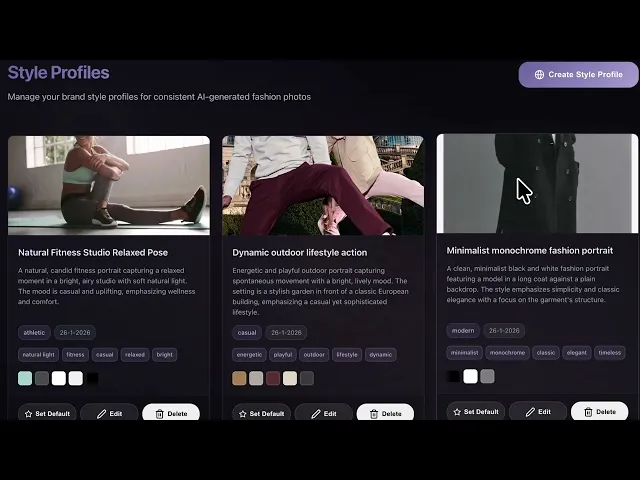
Create fixed brand presets: background, tonality, poses. This way all images remain on-brand. Checking for color consistency is essential: match the generated color with your product color in your system. Use guidelines for retouching and version control per channel (Shopify, bol.com, socials).
Compliance and trust: be transparent where necessary. The rights to generated images lie with you; communicate an internal review and approval process before images go live. This prevents miscommunication and maintains quality.
Practical tip: start a mini-pilot with 10 to 20 SKUs. Measure conversion impact, gather feedback from your team, and optimize your workflow. Schedule a demo via Sero Core Feeds to see how you automatically publish images to all your channels.
What is Sero Fashion, in 60 seconds
A short video about the Sero Fashion tool.
The short answer: for busy teams
Sero Fashion is an AI tool that generates fashion photography based on your product images and chosen AI models for fashion. You upload a photo of clothing, select a digital model, choose poses and backgrounds, and receive professional fashion photography ready for your webshop. This replaces or complements traditional photoshoots without the need for studios, model bookings, or weeks of planning. You generate variants in hours instead of days, with full control over lighting, scenes, and styling.
The biggest advantage: you save tens of thousands of euros per collection because you no longer need to purchase external photoshoots or pay model rights. The quality is outstanding: 4K studio quality, consistent product representation, and complete creative control.
The simple explanation
Imagine: you have a photo of a dress on a hanger. You upload that photo, click on a 'digital mannequin' that you like, and say: "Show this dress on this model, in this pose, with that background." Within minutes, you get a realistic fashion photo as if a real shoot had taken place. The AI 'fits' your garment onto the model, considers lighting conditions, and ensures that seams, colors, and details are correct.
Important: Sero Fashion is primarily intended for e-commerce fashion photos and on-model content. For complex art-direction or hero campaigns, traditional photography remains valuable, but for scalable product variants (PDP, PLP, marketplaces), AI delivers hyper-realistic visuals that can go live immediately.
Want to see if it fits your collection? Schedule a demo via Sero Studio.
How do you create AI photoshoots for fashion with Sero Fashion?
Step by step: upload product, choose model, generate images
The workflow is clear. You upload your product photos into Sero Fashion. Note: sharp images with good lighting work best, but even less detailed images yield good results. The tool recognizes the clothing type and fit. Then you choose an AI image model that matches your brand: age, style, appearance. You can generate your own models based on a brand description or upload existing models, which are reproduced royalty-free.
Next, you select background, setting, and pose. Want a studio look, an editorial vibe, or a lifestyle setting? You get an instant preview. After generation, you assess the output: are the seams correct, does the product color match well, does the fit make sense? This QA step takes seconds per image. Approved images are exported in the correct format for your webshop, marketplace, or ads.
How you create variants: changing backgrounds and studio looks
The power lies in speed and variety. You don’t have to photograph again to change a summer setup to a winter background. Upload your garment from multiple angles (front, side, back), so the clothing item remains correct in all poses. Create collections by combining multiple items: style complete outfits without a new shoot.
You can change backgrounds for seasons, campaigns, or A/B tests without additional costs. The studio-quality AI ensures consistent lighting and a professional appearance. Each SKU gets the same tonality and brand look, which is particularly important for large catalogs.
Do note that you check your images individually: bulk editing is possible, but you add clothing items or collections one by one and check details before they go live.
What results and use cases do AI photoshoots deliver for e-commerce?
Practical examples for fashion brands (PDP, campaigns, marketplaces)
E-commerce fashion photos for PDP and PLP are the most common applications. You generate on-model variants that improve conversion: customers see how a clothing item falls and fits. For editorial fashion photography (socials, ads), you create quick, appealing visuals without a shoot. With new colors or designs, you can re-shoot in hours instead of weeks.
For marketplaces like bol.com, consistency is crucial. With Sero Fashion, you generate images that meet guidelines: correct crop, background, lighting. You create different variants for each channel without new production. In a Shopify NL workflow, you export image sets per variant, with naming conventions and formats that you can upload directly. A/B-test main images to measure which pose or background converts best.
Also for example Zalando (if you sell there), the focus on specifications and consistency helps: uniform image quality increases trust.
Costs, speed, and ROI: comparison with traditional photoshoots
A traditional shoot easily costs thousands of euros: studio rental, photographer, models, styling, makeup, post-production. For one collection, costs can reach €5,000 or even €15,000. Time investment: days to weeks for planning, shooting, editing, and delivery.
With Sero Fashion, you pay a monthly fee of €399 for access to the tool. Additionally, costs are charged per generated image. Per article, you generate multiple variants in minutes.
Measurable impact: increased CTR on listings, higher add-to-cart rates, better conversion, and lower return rates due to realistic visualization. Track these KPIs to solidify ROI.
Discover how you integrate this into your entire content workflow via Sero Core Platforms.
What are misconceptions, pitfalls, and best practices in AI fashion photography?
Common misconceptions (and what is true)
Misconception 1: "AI is always perfectly realistic." Not entirely. Sero Fashion delivers hyper-realistic AI fashion visuals, but QA remains necessary. Check details like seams, logos, and color deviations. Small texture errors can occur; correct those before images go live.
Misconception 2: "AI replaces every shoot." Position it as hybrid. AI is ideal for scale, variants, and speed. For hero campaigns or complex art-direction (for example with special props or locations), traditional photography often remains the better choice.
Misconception 3: "Every product photo works." The quality of your input determines the output. Sharp images, consistent lighting, and correct cropping are crucial. Do not upload blurry or poorly lit photos; the AI cannot compensate for that.
Best practices for brand consistency, compliance, and quality
Create fixed brand presets: background, tonality, poses. This way all images remain on-brand. Checking for color consistency is essential: match the generated color with your product color in your system. Use guidelines for retouching and version control per channel (Shopify, bol.com, socials).
Compliance and trust: be transparent where necessary. The rights to generated images lie with you; communicate an internal review and approval process before images go live. This prevents miscommunication and maintains quality.
Practical tip: start a mini-pilot with 10 to 20 SKUs. Measure conversion impact, gather feedback from your team, and optimize your workflow. Schedule a demo via Sero Core Feeds to see how you automatically publish images to all your channels.
Frequently Asked Questions
What is Sero Fashion AI? Sero Fashion AI is a tool that generates professional fashion photos based on product images and chosen AI models, without traditional photo shoots.
How do you create AI photo shoots for fashion with Sero Fashion? Upload your product photo, choose an AI model, select pose and background, check the output, and export for your webshop or marketplace.
Are AI fashion photos realistic enough for a webshop? Yes, Sero Fashion delivers 4K studio quality with consistent product representation. Check details before publishing to ensure top quality.
How much does an AI photo shoot for fashion cost compared to a traditional shoot? A traditional shoot costs thousands of euros and takes days; Sero Fashion costs 399 euros per month plus generation costs, with output in hours.
What are the benefits of AI photo shoots for e-commerce conversion? Higher CTR, more add-to-cart, better conversion, and fewer returns due to realistic, consistent on-model content that instills trust in customers.
Conclusion
Sero Fashion makes AI photo shoots possible by converting product images into scalable, on-model visuals with studio quality. You save time, money, and have full control over poses, scenes, and styling. The workflow is simple: upload, choose a model, generate, check, and publish. Use cases range from PDP photos to campaigns and marketplace content. ROI is measurable through conversion, CTR, and return rates.
Ready for your first pilot? Start with 10 to 20 SKUs, measure the impact, and then scale up. Join us at one of our events and discover how Sero makes your team more productive.
In a maximum of three quarters of an hour, you will get a complete picture: from platforms, integrations, and pricing to onboarding and ROI. All questions will receive a clear answer.